Tuesday, March 06, 2012

Overthrow - an attempt to repair scrolling regions on mobiles


The guys over at the jQuery Mobile project recently made me aware of the Overthrow initiative at Filament Group (the main guys behind jQuery) to resolve the internal scrolling issues being experienced on so many mobile devices:
Here's the blog post, which links to the project page: Overthrow project
I'm looking forward to the slaying of this dragon!

Thursday, March 01, 2012

jQuery Mobile 1.1 fixed headers and footers

In general, jQuery Mobile's fixed headers and footers are a nice solution. Mobile browsers are getting better at supporting it properly with no visual artifacts, but they're still not all the way there.
Here's the jQuery Mobile 1.1 RC1 test page to try out your mobile devices:
(Note that jQuery Mobile has disabled page zooming on pages with fixed headers and footers to suppress some crazy behaviour!)
Their solution is based on this suite of test pages by Brad Frost: http://bradfrostweb.com/demo/fixed/index.html
You can comment below if you find anything weird.
To my surprise, three Android 2.3 devices do very well, (Hallelujah!) and our iOS5 device supports it very nicely - well, that is until you allow the user to pinch-to-zoom the browser page content! (Controlled by an HTML header page directive.) Then some very weird things start to happen. On Android 2.3 it seems to forget that it knows how to do fixed positioning, and on iOS5 it's even more entertaining: the fixed header will move at a different rate to the page content, and when you hit the right extent of the page, the header actually moves in the opposite direction to the page text! Who knew the iPhone supported parallax scrolling effects!!!
And here's the really bad news, if you're still on iOS 4 (or earlier). Since this platform doesn't support fixed positioning well, the jQuery team decided to 'degrade gracefully'. Unfortunately they put the emphasis more on degrade than gracefully, and now iOS 4 doesn't support any type of fixed header and footer at all without putting the onus on the developer. The previous solution was to have the header and footer fade out during the page scrolling (since it would move with the page content during the scroll) and then fade back in when the scrolling was done (since the browser would correct the position of the fixed position elements once the user lifted their finger).
I pointed out to the jQuery Mobile team that their new degradation strategy was biased toward web pages and not web apps, since now iOS 4 users could not have toolbars at the bottom of the screen, only at the bottom of their content. What a bad user experience that is! It's now virtually impossible to position a navbar at the bottom of the screen, which to me defeats the object entirely.
It appears that they see my point and we will at least have a way of falling back to the 'old way' soon, even if it is through a plugin or extension library.
I actually think there's an even better option for iOS 4, and that's using a javascript scroller div like the iScroll component. We already use a scroller in our mobile app and it works just fine on iPhone, (with the exception of textarea controls which grab the swipe event overriding the scroller). It was Android that was the problem. (See previous posts.)

Tuesday, February 28, 2012

jQuery Mobile RC1.1


At last! jQuery Mobile has released a candidate for the much anticipated version 1.1 with the 'Fixed headers and Footers' fix we've been waiting for.
As discussed previously, there was no good option for Android. The third party js widgets were slow to respond, jittery and buggy.
But now we can have fixed CSS headers & footers using native page scrolling. (If you want to know why it was such an issue, see this blog and vlog by Brad Frost.)

I'm going to test it out and report my findings. Stay tuned...

Monday, February 13, 2012

Sencha report on Mobile Chrome

Sencha Labs does a good job of putting HTML5 browsers through their paces.
As I was, they're quite well impressed with Mobile Chrome, but have already found some things lacking. This quote just about sums up my feelings on the subject of compliance versus real-world performance:
"As we’ve said many times previously, many mobile browsers do well on the checkbox tests like Modernizr, but fall short when it comes to real world applications and content. (In some cases, mobile browsers have even reported support when none exists.) So for real world testing, we use a collection of our own favorite HTML5 sites and demos.
First up, the new CSS properties for mobile content. On our HTML5 wish list for 2011 we asked for high performance position: fixed. And Chrome for Android delivers. For simple pages, Chrome for Android does a top notch job of glueing fixed position content to the screen. Fixed headers and footers for simple mobile optimized pages are now easily implemented without having to use a framework. However, the browser struggled when trying to maintain fixed positioning on more complex pages, particularly when combined with pinch/zoom. We saw poor frame rates and occasionally content disappeared or was misplaced. Happily, the very new -webkit-overflow-scrolling: touch property, which debuted in iOS 5, is also now available in Chrome for Android. It’s smooth and fast. (Nice job Chrome team!)"

See the full report here:

Wednesday, February 08, 2012

1st Impressions: Google Chrome Beta on Android ICS

Turns out I was right: Google have been working on Mobile Chrome. (I assume it will eventually replace the deficient default Android browser.)
As a x-platform HTML5 webapp developer, I have been burned BADLY by the default Android Browser. It sucked in four main ways:
- internal scrolling widgets (like iScroll)
- form rendering
- non-GPU accelerated 2D transforms
- inconsistent implementation from different OEMs.

The ICS default browser was a slight improvement in forms, but still full of rendering glitches and obviously not utilizing GPU acceleration for ops like scrolling and map panning.
First impressions on Android Chrome: Logistically we should see almost no fragmentation through Chrome than we do through the mangled browser implementations we are getting from the OEMs. (However, it remains to be seen whether some phones (typically HTC) will still omit to implement multi-touch in the browser from ICS forward, but it's a real problem for advanced web apps today.) Form rendering is better, rendering glitches are reduced, but performance is still on par with the ICS default browser. What gives? Chrome claims to implement hardware accelerated rendering? Compare Google or Bing maps on the web with the native implementation and you'll notice obvious lag. Then browse to the same URL with iOS Safari and you'll see how it should be done.
C'Mon Google - We expect better than this. You're LAGGING behind. (Pun intended.)

Monday, December 19, 2011

No Festive Goodwill from Apple

You are chatting with Alicia, an Apple Expert
Hi, my name is Alicia. Welcome to Apple!
You: Hi - I am considering a MacBook Pro.
Alicia: Hi!
Alicia: Ok
Alicia: How can I help?
You: Wondering if there are any plans for a Boxing Day Sale price in Canada?
Alicia: We do not have sales for Boxing Day in Canada. I'm sorry.
You: Oh! Boxing Day is my birthday! Can you offer me any special deals?
You: :)
Alicia: If I had any promo codes, i sure would!
Alicia: But I don't.
Alicia: I'm sorry!
You: Where might I get a special promo code from?
Alicia: We don't have them right now.
Alicia: That space is for when we have any (like shipping codes).
You: When do you have them? When is the best time to buy a Mac?
Alicia: It is very rare that we ever have them.
You: I bet you have them on Black Friday? Why not on Boxing Day for Canadians?
Alicia: This chat service is here to help with the Apple Online Store. How may I help with your shopping?
You: I have the items in my cart and I'm having trouble hitting the buy button...
Alicia: Ok. What seems to be the issue then?
You: It costs too much. A little seasonal goodwill from Apple would help.
Alicia: I'm sorry. If I had any promo codes to offer, I would offer them to you. Apple is known to be a company with little to no sales.
You: Well you may have just lost a customer. I think I'll buy an ASUS for $1000 less.
Alicia: That's fine. keep in mind, their quality is not the same as ours. It won't last you half as long either.
Alicia: If that's what you choose.
You: I don't think that you can qualify that statement. A friend of mine (loyal Apple customer) told me to buy the AppleCare warranty because he has ALWAYS needed it.
Alicia: Well, his situation might be different. I'm not going to argue with you.
Alicia: I don't have any discounts or promo codes to offer you.
Alicia: Is there anything else today?
You: I didn't come here to bash Apple. I want to buy one but I'm not getting a warm and fuzzy that would make me a happy customer. I will have to think about it some more... Thank you for your time.
Alicia: Well you are asking me to give you something that I simply do not have. If I did, I totally would. But you thinking that I do and just won't give it to you.
You: If you threw in a free 1 year One-to-One membership or something like that, I think I would buy it today. All I want is a little good will or flexibility.
You: But it sounds like your hands are tied.
Alicia: My hands are tied. I have absolutely nothing I can "throw in" or any promo codes I can even offer. If I did, it would be no problem giving it to you!
You: OK. Bye Apple.
Alicia: Thank you for visiting the Apple Store. We appreciate your business. If you would like more help, please chat with us again.
Thank you for choosing the Apple Store. If you have any additional questions, please chat us again.
Wednesday, November 23, 2011

Layout strategies for iPhone & Android, Portrait & Landscape, Web App and installed App

Tactile Mobile apps are where it's at - they've revolutionized the user experience to become so intuitive that even babies claw at their parent's phones to make the pretty lights move with their fingers.
We are no longer talking about clicking, double-clicking and dragging, but about tapping, holding, pinching and swiping.

With this revolution come certain expectations. I now expect an immediate response to my gestures and to have the phone sense when I turn it and adjust accordingly.

This post is about how to meet the user's expectations around resizing when developing HTML5 in the mobile browser.
"But isn't that the browser's job to layout my app properly no matter which way the phone is turned?" I hear you ask.
No. Unless your web app is really just a web page with no special layout restrictions, you are mistaken to think that the browser will do this for you with no effort on your part.

First of all, play with your phone's browser a little to understand what it does with a regular web page. Don't get caught in that 'false security zone' which makes your brain think that it's so intuitive that it always knows what it's doing. After a few minutes you'll probably be surprized at what you thought you knew.

One common scenario is that the browser zooms out to a predetermined width by default, making the page elements look very small and sometimes illegible. This is great when you're browsing the web, but not what you want when displaying a web app UI. So the first thing you should know is that there are special HTML5 mobile directives which tell the mobile browser how to present your web page.
I won't go into that here, there are plenty of references on the internet, like this one:
http://learnthemobileweb.com/2009/07/mobile-meta-tags/

However, I will tell you that what you probably want is this configuration:
<meta name="MobileOptimized" content="width" >
<meta name="HandheldFriendly" content="true">
<meta name="viewport" content="width=device-width, user-scalable=no, initial-scale=1.0, maximum-scale=1.0, minimum-scale=1.0">

This will encourage the phone to size your page to the width of the device, disable the ability to pinch-zoom the page content, and prevent the browser from scaling your content when rotating the phone.

But what about more complex layouts?
A common goal for mobiles apps is the iPod interface layout on the iPhone: A header bar along the top with back and forward buttons either side of the title, a toolbar with icons along the bottom and a scrollable area in the middle showing a list of things (Artists/Tracks/Genres, etc).


One of the fundamental differences with browsers compared to application layouts is that fixed height layouts are hard to implement. The idea being that if you constrain the width the content must be shown and should therefore flow down. Doing fixed height layouts on browsers has often been a challenge. On mobile, the challenge has been further complicated by the fact that internal scroll areas have encountered problems. (iPhone has only in iOS 5 started supporting scrollable divs.) Widgets like iScroll have emerged to try to give web apps the ability to mimic native layouts. However, as I have discussed in previous posts, Android has some serious issues in this area.
However, let's suppose that in an ideal world (i.e. on an iPhone) the center panel scrolls smoothly. What hurdles do we have to leap to support device rotation in the browser?
In essence, assuming the top toolbar stays in place, there are two main things to do: size the central scroll view and position the navbar at the bottom.
This turned out to be a lot harder to implement on Android than on the iPhone.
I came up with a strategy to determine the available screen dimensions and divide up the UI into its proportional parts: status bar, toolbar, content area and navbar. I could then determine the dimensions for each based on the device type and orientation.

Cross-platform (in)compatibility
Things were pretty straight-forward on the iPhone. My strategy seemed sound. The browser did what it was supposed to do and soon I was rotating the device and seeing the layout adjust accordingly. The theory was that this would 'just work' on Android. How wrong I was.
The two main things that made this difficult on Android were:
I soon discovered that the Android browser did not report the physical screen dimensions correctly.
Using jQuery Mobile, Android was also challenged in reporting what mode it was in: landscape or portrait. In fact, much of the time it was opposite to what was reported on iPhone! I discovered that the orientation change was fired from the resize event, and so ended up just working it out from the browser's resize event instead.

To resolve the first issue on Android, I used the bottom css property to compensate for the fact that it could not tell me the dimensions of its own screen. Fortunately this worked, or I would have been really stumped. Ironically, the same approach didn't work on iOS, so I needed to handle each platform differently.
A further issue with the Android resize event is that it gets triggered when the keyboard is up, and reports the new dimensions of the area displayed above the keyboard. And on certain devices, the available height is now less than the available width, which makes the code think it's in landscape mode! What's more, the navbar is repositioned just above the keyboard, since that is now, temporarily the bottom of the webpage... Grief like this makes you wonder if it's worth it!

iOS Standalone Mode
On iPhone, you can save a web app to the Home screen. You will want to tell the iPhone that your app supports this mode using this directive in your HTML page's head section:
<meta name="apple-mobile-web-app-capable" content="yes"/>
You can even define a custom home page icon and loading image:
<link rel="apple-touch-icon-precomposed" sizes="114x114" href="images/icon-114.png" />
<link rel="apple-touch-icon-precomposed" href="images/icon-57.png" />

<link rel="apple-touch-startup-image" media="mobile" href="images/fl_startup.png" />

This is awesome for mobile web developers who don't need the App Store. This mode gives a less cluttered interface to the user, and makes the app feel more like a native app than a webapp. The address bar no longer is accessible, and the web browser's toolbar is gone. :)
In javascript, Apple provides a special flag to determine the mode you're in:
window.navigator.standalone
You can use this to help when laying out code to determine whether the web toolbar is taking up space.

Supporting high resolution displays
Here's an example of how to use a high resolution image on wide or high pixel density devices:

@media only screen and (-webkit-min-device-pixel-ratio: 1.5),
only screen and (min-resolution: 240dpi) {
.ui-icon-spinner {
background-image: url(../images/spinner@2x.gif);
}
.ui-icon-spinner {
-webkit-background-size: 16px 16px;
background-size: 16px 16px;
}
}

CSS Only Solutions
This is a bit beyond the scope of this article, but there's a school of thought that CSS3 media queries can be used to cater for 90% of the situations without 'resorting' to code. The irony is that the media queries themselves are quite 'code-like' in their formulation, and so it's really just a case of picking your poison.
However, the possibility exists to do some great things with layout on different sized devices using CSS3 queries. A classic example is to define a layout which stacks layout blocks vertically for small devices, but horizontally for larger devices like tablets and desktop browsers. One can even hide certain elements when available screen space is at a premium.


Wednesday, November 16, 2011

I am Android - for we are many...

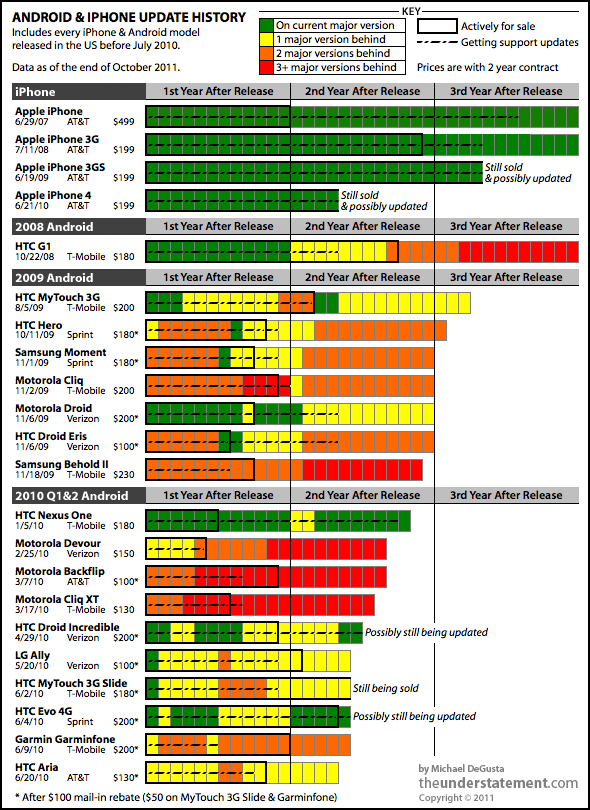
A picture of health? In this case green is healthy and iPhone is in excellent health compared to Android which is red and burning hot with a fever.
I think this pretty much sums up my statement in the last post that Android is not a platform but really a minefield of similar but significantly different devices derived from a common base.
This is based on research published in a blog post by Michael Degusta.


This picture is like a burning fire which should have the effect of warning developers to stay away!
And the best supported phone on this chart is the HTC Nexus One. But it's the end of the line for the Nexus - "it's just 'too old' for the new software". (Link to news article.)

(Thanks to Wazoo for pointing this out to me - and for quoting my blog!)

Tuesday, November 15, 2011

This is not the Droid we are looking for!

My previous post indicated that I had frustrations with Android.
I will tell you why.

But first of all let me congratulate Steve Jobs & co for raising our expectations so high! The iPhone really is a product that deserves its place in the history books of technological advancement. It really does deliver exceptionally well on all fronts - including its excellent embedded browser. It is a shining example of standards support and best-in-class implementation. Steve Jobs had a theory that user experience should drive your business. With the iPhone he realized his vision and exceeded my expectations.

Back to Android. Android is assumed to be a direct competitor to the iPhone and somewhat on par with it. At least it's marketed that way, and I would say perceived that way, by many.
The reality is a very different story. The difference is that where iPhone controls the hardware of their platform and is therefore working from a common hardware base, Android is an open architecture. The Android software is available for all the wannabe hardware manufacturers to base their software build on. Each manufacturer puts a different hardware configuration together and tweaks the basic software to work with their hardware. For competitive advantage, some manufacturers will also tweak the browser software and other components to their own whim. So when a phone says it is Android 2.2, it will not necessarily work the same as another 2.2 phone. There will be differences. Not all 'droids are created equal.
To compound the problem, the carriers will also want specifics for their own purposes. For example, custom apps bundled in to the base build to be pre-installed on the phone.
Furthermore, where it falls apart is in the software landscape. How do you get a software update for your phone? From the provider. Who releases the build? The manufacturer through the provider. So now the manufacturer is a software development house. They have branched the code for all their devices, and are stuck with supporting them. They not only have specific builds for each of their hardware configurations, but also have to customize that build to satisfy the demands of the network providers. And it's not in their best interests to be caught in a support cycle. There's no revenue in that - the phone has already been sold. They are interested in getting the next product out the door before their competitors do. And as we've seen, getting updates for Android has proven extremely frustrating for end users. Think of all the effort required to put the next great Android release from Google onto an already released phone. Chances are that the effort will be put into the next phone to be bought, not the one that has already been sold.

So how does all this affect the developer?
Well, to deliver on Android we have to contend with many, many different devices, many of which have different software configurations and patches on them. And this assumes that there are no hardware glitches or known issues - a very naive assumption when you realize that most of these products have been rushed into a highly competitive market.

Steve Jobs actually addressed this situation in what is called his 'Google rant'. I just think he was trying to expose the truth and help Google to see that they were going down a path that would induce pain on all fronts. You could see this as an arrogant 'told you so' rant, but I see it as a fair warning and glad you told us.

So taking all this into consideration, as a software architect you might look for ways to alleviate the pain. No development shop wants to manage any more code branches than they have to.
As an architect, you would not be at all blamed for following this line of thought: Android is not really a standard, but a myriad of very similar, but significantly different products. I need a common platform to deliver on. Is there an alternative?
Hang on, isn't that excellent HTML5 compliant iPhone browser based on webkit? Yeah - it's actually called Mobile Safari. Isn't Google Chrome based on webkit too? That browser on the Android phone is also webkit-based and HTML5 compliant. It must be Mobile Chrome. Why don't we build our apps to web standards instead? I've heard you can do some really nifty animation effects with CSS3... this could be just what I'm looking for, and it actually might be a lot of fun!

STOP RIGHT THERE!
Time for a reality check (or two)! (Remember that I'm biased towards creating cross-platform HTML5 mobile apps, so I'll talk a lot about the browser.)
  • Reality check #1: The current Android browser is not Mobile Chrome. Remember - Google bought Android, they didn't make it. It may pass the HTML5 compliance tests, but that does not mean to say it does it well. My experience with the Android browser is that it's glitchy, inconsistent across devices and rough around the edges. For example, its rendering of CSS3 rounded corners is noticeably jaggy, and positioning of elements is often off by a pixel creating gaps where there should be none. (My suspicion is that Google are frantically re-implementing the Android browser to become the Mobile Chrome many think it is.)
  • Reality check #2: All Androids (and their browsers) are NOT created equal. Manufacturers tweak the browser code too for their own purposes.
  • Reality check #3: There are also certain commercial, political and legal reasons why things are different on different Android devices. Don't believe me? Load up Google maps in the Android browser and try doing pinch to zoom on a 2.x HTC phone. Now try the same on a Samsung phone. The difference? HTC does not want to impinge on multi-touch patents, hence no pinch to zoom in the browser. (Samsung supports pinch-to-zoom. But they had to withdraw some devices in some countries because of patent infringement. Could there be a link?)
  • Reality check #4: Just because it's got it, doesn't mean to say it flaunts it. Android devices have some of the most impressive hardware specs around. Multi-core processors, GPUs & gobs of memory. However, try panning Bing Map in the Android browser. Then try it on an iPhone. The difference: Android does not implement hardware acceleration in the browser rendering of elements, and it shows.
  • Reality check #5: Even though it's in the best interests of Google to improve Android fast (to live up to the expectations of its customers and become a truly viable competitor), this does nothing to rectify the myriad of broken/deficient devices that are already out there. And even when they do fix the Android reference build, how will they enforce standards on an 'open' community who will continue to tweak the core to meet their own agendas?
In short, if you were expecting Android to be a platform you could deliver on, be ready for a reality check. You might have been looking to extend your application to other devices, and assumed that Android was a platform just like iOS. However: "This is not the Droid we were looking for!"
Welcome to the minefield that is Android. To mis-quote a biblical verse: "I am Android, for we are many."

Tuesday, September 27, 2011

The Reality of Mobile Web Development

I'm just coming out of the other end of our mobile web project. What an interesting, and sometimes frustrating ride!
Here are some conclusions:
  • jQuery Mobile is now at release candidate 2
  • iPhone rocks on the mobile web
  • Android browser is deficient
  • Blackberry is seriously deficient - don't go there - it'll be stone dead in a moment!
  • Windows Mobile - Late out of the gate, initial signs are good, but it's too early to tell
If the promise of cross-platform mobile web applications is going to be fulfilled, standards need to be conformed to, and implementation of those standards must be done well. Android should really be a contender, but they need to get their act together.
The theory of cross platform mobile web development seems sound: both iPhone and Android phones are smart devices with large memory footprints and state of the art processing power. Both have WebKit-based HTML5 compliant browsers. However in the real world they are worlds apart. You see the devil is in the details. In the final analysis, iPhone is a platform and Android is a minefield of different software and hardware configurations based on a core reference implementation. Android is not a platform, so much as a legion of platforms built out of similar materials.
It's PC vs Mac all over again in the mobile space.

As I have time, I'll go into details in other posts, including:
  • This is not the Droid we were looking for!
  • Layout strategies for iPhone & Android, Portrait & Landscape, Web App and installed App
  • Delivering flexibility - versatile deployment strategies
  • Optimization & caching techniques
  • Integration with Facebook

Wednesday, March 16, 2011

Native vs Hybrid

I read an interesting post reporting on a debate between developing mobile Web Apps vs going Native. This has been a hot topic at work lately, and I'm a big advocate of doing what fits best. I like to keep my options open, and not be forced into a corner. So in many instances, I come down on the side of cross-platform HTML5 WebKit apps.
Whereas some applications are definitely best implemented as native, (arcade style games come to mind as obvious), many business & productivity applications are content driven, and must be connected. Sure we need a slick user experience - and Apple devices have certainly raised the bar in this respect. But in many cases the emphasis from a development point of view should be on cross-platform capability, not device-specific slickness. The quandry is, that this is not really in the best interests of the device manufacturer who has so much more to make than the price of the device if they can just lock you in to their platform.
That said, you can have the best of both worlds with tools & frameworks like WebKit, jQuery Mobile and PhoneGap. WebKit transitions are as good as native, jQuery Mobile promises to give a consistent & performant cross-platform experience (just give it a few more months) and PhoneGap gives you the choice to wrap it all up in a native shell and enhance only the parts of a WebApp that need to be native without having to go completely down the one-way dead-end street of single platform implementation.
Objective-C and Cocoa Touch taught us a lot about how to do mobile right, but now it's time to leave the Apple University and realize that the real world does not revolve solely around Apple.

Thursday, January 27, 2011

Going Mobile

After two years of travelling, with Sun going down on me, and Oracle rising on the horizon without me, I came back to the Calgary market.
It has been an interesting time for web development, with a significant ICEFaces project under my belt, I took another look into the available frameworks and found some satisfaction in ZK. One of the factors being that I needed a solution that could scale into mobile browsers.
Even though ZK is great on the desktop, ZK Mobile was not really what we wanted for the small form factor devices. They need to re-think their mobile strategy. I think the industry in general is trying to adjust to the fact that mobile Java (JME) is fast giving way to the mobile web, and many will be having to take Javascript much more seriously than we did in the past as fully capable WebKit browsers become predominant.
In an effort to rationalize mobile development across multiple platforms, without having to write native apps in each one, I've been looking closely at the new wave of mobile web technologies.
My current focus is on building AJAX apps with jQuery and the new jQuery Mobile framework, and wrapping them in PhoneGap for psuedo-native apps which can be submitted to the AppStore, Android market, etc.

Watch this space for technical hints, tips (and vents) as I negotiate this new landscape.

"That Flipping Property Game" is a finalist!

After a long development incubation and loads of playtesting and tweaks, "That Flipping Property Game" was acknowledged as one of the four finalists in the "Canadian Board Game Design Awards" run by the FallCon Gaming Society.

They even interviewed me!


Thursday, October 09, 2008

Composite Controls with ICEfaces and Facelets

I've been interested in ICEfaces for a while now, and been pleased to see how the adoption is coming along.
One thing I've noticed is how many AJAX and Rich-client frameworks impress with cool widgets but make things complicated through excessive use of Javascript or poor integration at the back-end. I think there's danger in choosing a framework for it's widgets, and there's a risk that people look at ICEfaces purely as a JSF rich component set, not as a complete framework, which it truly is.
Being built on the JSF framework, ICEfaces is a first-class citizen in the JEE world and integrates well with just about any other Java framework. (It can even play nice with a surprizing amount of other JSF component frameworks, like Apache My Faces.)
On top of this, their IDE integration is top notch, supporting just about anything in common use today. After using Eclipse for a while now, I've recently moved to NetBeans due to my new role. Thank goodness the ICEfaces IDE support module is there!
Recently I have had the pleasure of re-aquainting myself with ICEfaces. I finally got the job I've been hoping for since my first brush with JSF a few years back. I'm now a UI architect and it's fantastic to have the company respecting my opinion that ICEfaces/Facelets/JSF is the way to go for enterprise rich internet application (RIA) development.
I even got the opportunity to take my new team on an ICEsoft training course to get them excited about the possibilities. The people at ICEsoft have a great, open approach. They are interested primarily in productivity, and gave all kinds of ideas in how to best use their framework and how to best utilize other tools to be productive. In two days they were saying things like "that's so cool", "this is how web app development should be" and "I'm never going anywhere near Struts again". In ICEfaces, you hardly ever have to think about the request and what values it's sending. You're thinking in terms of components and objects and services - that's the way OO development should be.
I thought that I knew what there was to know about the whole gamut, but there was even a revelation for me: How to make re-usable AJAX enabled components using Facelet composites. I thought I would have to be making new JSF controls and digging into writing TagLibs, Javascript and writing JSF lifecycle event handlers. But I was completely surprized just how easy it is to make a re-usable components that combines the power of Facelets with the coolness of ICEfaces AJAX components. (Perhaps I'll blog on this some time. I had a cool widget up and running in about half a day, and then spent a little more time to extend it.)

Well that's it for now. Take my advice, the next time you think about doing a Java Web App, evaluate ICEfaces. (And don't just look at the component showcase, evaluate the whole framework.) You may find it very enlightening.

Friday, August 01, 2008

Alberta Board Game Developer Gathering

The game mentioned in the last post has been playtested, tweaked and enhanced.
"That Flipping Property Game" will be presented to a group of discerning Board Game Designers over the August long weekend at the first "Alberta Board Game Developer Gathering" sponsored by The Sentry Box in Calgary.
Several Alberta-based designers will be attending with their polished prototypes to share ideas and shape their new game designs.
I'm much looking forward to it!

Monday, December 03, 2007

New Boardgame in the works...

This year I had one of 'those' ideas - one that you just HAVE to pursue.
The premise of the idea was: "What would a Euro-game version of Monopoly be like?"

The answer is a lot more like a Euro game than Monopoly, but it does have properties for sale! ;)

Watch this space...

All Faces: Java Server Faces, ICEFaces and Facelets in Weblogic Workshop 10.1

It's been a while since I last looked at JSF seriously. The projects I work on day-to-day for the last little while have been Swing and Struts-based.
However, I recently had good reason to delve back in where I left off quite a while ago, and frankly, not much seems to have changed.
Probably the most significant progress is in visual JSF development and AJAX support. We're seeing more developed components and better integration. However, out of the box support for getting up and running with different JSF configurations is still sparse. I feel that things could be a lot smoother with smarter tools support.
JSF is still struggling for dominance over a legacy created by Struts adoption, and an uphill battle against burnt fingers and mis-information about the framework.
I agree with Rick Hightower, that, once configured, you can be more productive and will find things more intuitive than Struts. However, if the goal is to make things as smooth as, say, ASP.NET 2.0, there is still some way to go.

I'm personally rooting for ICEFaces, who have made a fair bit of progress in the year since they Open-Sourced their JSF AJAX framework. ICEFaces is J2EE AJAX 'done right'. The Javascript is managed by the framework, giving a Java programmer the ability to control the state of the UI eficiently and dynamically from the server, using 'AJAX push'.

Having worked with Weblogic 10 for the last little while, I have been impressed with the complete toolset, including the development environment which allows easy integration with Weblogic server on the desktop. Weblogic Workshop is a custom version of Eclipse which includes advanced support for JSF authoring. BEA now includes ICEFaces support within the IDE. However, I ran across a couple of gotcha's which you may be interested in knowing.

ICE Faces support is available as a facet for a Dynamic Web Application in Weblogic Workshop 10.1
Read BEA Dev2Dev introductory article here.
All really good stuff.

Integrating with Facelets involves jumping a couple more hurdles:

BEA support at present is for ICE Faces 1.5.3. It can be added as a Facet to a Dynamic Web Project.
This is not compatible with later versions, and so when integrating facelets, you will have problems if you use the latest downloads from ICE Soft. Make sure you use the icefaces-facelets.jar from the 1.5.3 release if you are using Weblogic Workshop 10.1
The next logical step for BEA would be to include facelets as a project facet dependent on the ICEFaces facet.

Another thing that wasn't immediately apparent to me, is that icefaces-facelets.jar is a complete implementation of facelets, so you don't need to include jsf-facelets.jar in your project. Use icefaces-facelets.jar instead of the default implementation.

Once you get Facelets and ICE Faces configured correctly, you will probably want the IDE to help you with the TAG syntax. However, you will find that you will have little code-completion context help if you use the XHTML format preferred by Facelets.
Eclipse in general is not much help here. MyEclipse has made an effort to correct this oversight. However, all is not lost if you're using Eclipse WTP or Weblogic Workshop.
The trick is to use JSPX format to declare your namespaces. This will introduce code completion for your ICEFaces components, but Facelets tags will still be ignored. You need to get hold of the TLD taglib file for Facelets and place it into WEB-INF/tld.

You can get the Faclets TLD tag-lib file here:
jsf-ui.tld

And here's the final result:

Hope this helps!

Wednesday, October 10, 2007

CJUG Presentation about Facebook on October 10th

I guess I've been camping too much this Summer to blog!

I presented at CJUG this month on F8 - The Facebook Developer Platform for Java.
I'm being lazy, and so I'll redirect you to the Facebook Event where I posted links for those of you dying to get your apps developed and registered on Facebook.

Wednesday, November 01, 2006

Two-Way SSL in Weblogic for Developers

I've been scratching my head, throwing my hands up, even questioning my abilities as a developer for the past few working days trying to work out SSL.
And not because the theory is over my head, or because I couldn't find information on the subject - but because I was asked to simulate an existing production environment in development. A Two-Way SSL (or Mutual Authentication) setup, to be specific. A configuration that takes SSL setup to the limit!

If you need a primer on this subject, the theory and an example using Weblogic's demo setup is laid out clearly in this excellent article:
http://monduke.com/2006/06/04/the-fifteen-minute-guide-to-mutual-authentication/

Usually in development environments you can cut corners - but not with security. In fact I discovered it is more of a challenge for a couple of reasons:
1) Just about everyone who writes about it assumes you're setting it up for real and skips over the details if you don't want to get involved with a signing authority like Verisign - or, like the article above, you're using a test CA that has already been set up.
2) You have to simulate all the parts - including the bits the Verisigns and Thawtes usually take care of.

So to try to do the noble thing and save one or two of you that may be tortured with the same task, I am going to reveal the secrets of setting up Two-Way SSL using Java and Weblogic Tools using a Self-Signed CA certificate for development environments.

The tools we need for the job are:
  • Java keytool
  • BEA's modifed keytool: ImportPrivateKey
  • BEA's CertGen - Certificate Generator

All these tools do similar things and it's the subtle differences that'll kill ya. Be warned - you may be safer playing with a chainsaw! ;)
(I have a hunch there may be a way you can do this with just Java keytool, but I'll try to crack that one later on. If I do I'll post the solution here.)

I'm assuming, of course, that you've got Weblogic installed. For the record I'm using 9.2 and you should be somewhere in that vicinity too.
Note: Before you start, run setDomainEnv in the bin directory of your server domain.
e.g. on Windows:

path_to_bea\user_projects\domains\my_domain\bin\setDomainEnv.cmd


  1. Use CertGen to Generate Server Private Key and Certificate
    What we need at the outset is for everyone to trust us. We're all going to trust each other here because I say so. That's what the selfsigned switch is all about. In the real world, we trust each other because we mutually trust a Certificate Authority (CA) like Verisign. Here we're saying "I am the CA".

    java utils.CertGen -selfsigned -certfile MyOwnSelfCA.cer -keyfile MyOwnSelfKey.key -keyfilepass mykeypass -cn "My Own Self CA"

    You should see this response in the command window:
    Generating a self signed certificate with common name My Own Self CA and key strength 1024

  2. Create the Identity Keystore
    CertGen created a unique and secret Private Key for the server we're using and the Self-signed Root Certificate for us. But Java wants them packaged up neatly into a keystore.
    The one thing Java keytool doesn't do is import a ready-made private key...
    Drat!
    Fortunately BEA are a smart bunch and created a utility to help.
    And just to make sure there was no confusion about what it does, they called it ImportPrivateKey.
    Told you they were smart, didn't I?

    Now run this:
    java utils.ImportPrivateKey -keystore MyOwnIdentityStore.jks -storepass identitypass -keypass keypassword -alias trustself -certfile MyOwnSelfCA.cer.pem -keyfile MyOwnSelfKey.key.pem -keyfilepass mykeypass

    Imported private key MyOwnSelfKey.key.pem and certificate MyOwnSelfCA.cer.pem
    into a new keystore MyOwnIdentityStore.jks of type jks under alias trustself

  3. Import the Certificate into a new Trust keystore
    If you read the Monduke article from above, you'll know the name of the game is trust.
    When the client asks the server for a connection, the server will only allow access if it trusts the signer of the client's certificate. This is going to be the "My Own Self CA" and to make it happen we need our trusty MyOwnSelf certificate packed up into a separate keystore called the Trust Keystore. When the client presents it's certificate, this is where the server will look to see if it trusts the signature of the CA.
    keytool -import -trustcacerts -alias trustself -keystore TrustMyOwnSelf.jks -file MyOwnSelfCA.cer.der -keyalg RSA

    (Replace with equivilent ImportPrivateKey command?)

    Here's the tool's response:
    Enter keystore password: trustpass
    Owner: CN=My Own Self CA, OU=FOR TESTING ONLY, O=MyOrganization, L=MyTown, ST=My
    State, C=US
    Issuer: CN=My Own Self CA, OU=FOR TESTING ONLY, O=MyOrganization, L=MyTown, ST=M
    yState, C=US
    Serial number: ...

    Trust this certificate? [no]: yes
    Certificate was added to keystore

  4. Configure WLS with Identity and Trust stores

    Now we have an Identity Keystore for Server to Client communication (to supply certificates to the client) and a Trust Keystore for Client to Server communication (to accept certificates supplied by the client). We now need to tell Weblogic to use them.

    In the Weblogic Admin Console jump to the Keystores page and choose "Custom Identity and Custom Trust"

    Enter the locations of your Identity and Trust keystores, the passphrases identitypass and trustpass respectively, along with the alias in the SSL tab (I used 'trustself' above). The Private Key password in this example is 'keypassword'.

    When you've saved and activated your changes in the admin console, check the Weblogic command output window to verify that your Identity and Trust keystores were loaded with no problems.

  5. Test One Way SSL
    Under the SSL tab, make sure Two Way Client Cert Behavior is set to "Client Certificates Not Requested".

    This is important - make sure you have these entries in your config.xml file in the config directory of your domain:
    <client-certificate-enforced>false</client-certificate-enforced>
    <two-way-ssl-enabled>false</two-way-ssl-enabled>
    <server-private-key-alias>trustself</server-private-key-alias>

    If any are different, edit and save the config.xml to match, and then restart the Weblogic server.

    Now browse to https://localhost:7002/console
    (Assuming defaults.)


    All being well, the server should present the client with a certificate.
    However, the client has no reason to trust our Self-Signed Certificate yet, so it will throw up a dialog. (Also the name doesn't match that of the server. This isn't too important in a development environment - but something you'd definitely fix for production.)

  6. Install the Server Certificate on the Client
    To have the client trust the server permanently, we need to Install the certificate. Hit install and follow the instructions. When you next go into the Certificate Management screen you will see the "My Own Self CA" listed under "Trusted Root Certification Authorities"

  7. Test Two Way SSL without Client Certs required

  8. Now go into the WLS Admin Console and switch the
    Take a look at the WebLogic server console output:

    NO_CERTIFICATE

    The only way we got to the page was because we set Weblogic to ignore the fact that there was no client certificate. For truly secure Two-Way SSL where only authorized clients can talk to our server, we need to put a certificate on the client to send and require that the server check it.

  9. Create a client certificate using the Self-certified CA certificate

    Now we basically need to set up the opposite situation on the client that we did on the server. But, of course, there are some crucial differences. Wouldn't be any fun otherwise...

    It's time to generate the certificate for the client. This time we want the Certificate to identify the client machine (usually the user of the machine - you can set up one client certificate per user and have more than one on a machine if you need to), AND we want to ensure that the Client is linked to the Trusted CA Root Certificate we fabricated earlier. (This is why the ou (operating unit) of the client certificate must match the identity of the Trusted CA Certificate - in this case "My Own Self CA".)

    java utils.CertGen -certfile MyClientCert.cer -keyfile MyClientKey.key -keyfilepass clientkeypass -cacert MyOwnSelfCA.cer.der -cakey MyOwnSelfKey.key.der -cakeypass mykeypass -cn "My Client" -e "my.own@self.com" -ou "My Own Self CA"

    Generating a certificate with common name Client User and key strength 1024 issued by CA with certificate from MyOwnSelfCA.cer.der file and key from MyOwnSelfKey.key.der file

  10. Bundle up the Certificate and Key into a Format the Browser will like (it's PKCS12 if you have to know)

    Having the client certificate in bits won't be much appreciated by the browser, so we need to package it up - like a identity keystore, but in a different format that browsers like.

    java utils.ImportPrivateKey -keystore MyClientCert.p12 -storepass clientpass -storetype pkcs12 -keypass clientkeypass -alias clientcert -certfile MyClientCert.cer.pem -keyfile MyClientKey.key.pem -keyfilepass clientkeypass

  11. Import Trusted CA Certificate and Client Certificate into Browser
  12. There are essentially two pieces to the pie. First you need to import the Root CA Certificate so the browser trusts certificates sent from the server.Locate the MyOwnSelfCA.cer.der file that was made in the very first step, and import it into your browser as a Trusted Root Certification Authority (Tools > Options > Content > Certificates in IE)If using IE doesn't make you go weak at the knees, the easiest thing to do now is double-click the certificate file you just made. (MyClientCert.p12) IE will launch it's import certificate wizard and you'll be ready to roll.

    If you want to make life hard for yourself, then I'll assume you know how to import client certificates in your favourite browser and move on...

  13. Test Two-Way SSL
    The moment of truth:
    Browse to https://localhost:7002/console

    This is what should happen:
    1. Client request to server
    2. Server response - sends certificate signed by "My Own Self CA" and requests a certificate from the client
    3. Client examines certificate - decides to Trust it since it has the CA certificate for "My Own Self CA"
    4. Client sends its certificate to the server, again signed by "My Own Self CA"
    5. Server finds up "My Own Self CA" in its Trust store and decides to trust the client
    6. Server sends requested resource back to the client in encrypted form
    7. Client deciphers the encryption and displays the result - in this case the Weblogic Admin Console login page.

Tuesday, September 12, 2006

Cambrian House - Beyond IdeaWarz

One of the early criticisms of the Cambrian House IdeaWarz system is that anyone can post an idea in a few words, but how do you really sift the good ideas from the bad?
A popularily contest between ideas in the voting system, while being a loose indicator of gut reaction to an idea, is obviously full of flaws.
The idea may sound good, but how realistic is it? It is technically feasible? Is there a market? Is it actually original? Is it a shallow idea in embryo, or has the submitter put a lot of thought and research into it?
Some ideas on a napkin may sound like they've been done before. Is this a reason not to pursue it? Perhaps if something moderately successful was re-done better, it would be hugely successful? This is often the case in the real world. (Think: Google)
To achieve commercially viable projects, the idea has to go through many more trials and refinements to get it into a viable state. It's a process. Anyone who has realized an idea knows this. The ability to comment on Ideas in IdeaWarz is an informal way of challenging an idea and helping to refine it. But it's obviously not enough.

I made some suggestions to Cambrian House and hopefully they'll implement something along these lines.

After a little consideration, this is how the process could work:

Idea Submission
Putting down the essence of an idea in just a few words, along with some background on where the inspiration came from is a fine place to start. But sometime early in the submission process, the idea needs to be qualified for feasibility. I think that once an idea is submitted and passes the first gate of suitability (i.e. it's not offensive and meets the guidelines, and it's generally suitable for the CH Crowdsourcing model), it can enter IdeaWarz and get some feedback.
At the same time, Cambrian House should solicit some refinement of the idea from the submitter to enter the second gate.
(Along the lines of "Thanks for your idea. It has entered our initial feedback system IdeaWarz. We want to know more. Please log in and fill out the Self-Grading Justification Form to enter the next stage of the process.")

Self-Grading Justification
The submitter of the idea should now be asked to justify their idea by writing a concise description of the idea and self-grading it in the following areas:

  1. Suitability for Crowdsourcing on CH

  2. Originality

  3. Potential Market

  4. Commercial Viability

The self-grading process is not just intended to be a score out of 10. A paragraph or two on the fit in each of these areas is needed. For example, an idea that's not wholly original is not a bad idea for the model if a large market exists to be tapped into. And a product that's targeted at a smaller market with high saturation is often better than a mass market product that has high competition or low saturation. An acknowledgement of the potential challenges an idea may face and how this can be overcome adds strength to the idea.
Once the submitter of the idea has put a mark on their idea, it is then opened to the community to agree or disagree with the ratings, by adding their own ratings and comments. Do they think the idea is as marketable as the author does? Maybe there's an application of the idea that the author hasn't considered?
Discussing and brainstorming the idea in this way will help to mould it and may open other possible markets that were not originally conceived of.

Doing this would weed out weak and unsuitable ideas pretty quickly. The idea can stay in embryo on IdeaWarz but would never pass that stage if it cannot be solidified.
Why keep it on IdeaWarz? Why not just remove it?
Because ideas breed ideas. A weak idea can provoke a stronger more refined one. Keep the think tank full!
(I think it should generally be at the submitter's discretion to remove an idea. This is a function that is currently missing at Cambrian House.)

Solidification
So now that we have an idea that has some substance, we enter stage 2: Solidification. Here we get to be more critical of an idea. Cambrian House users can now start to contribute to ideas that have been justified by their submitter. It's an open forum where others can rate the idea according to their own perspective, challenge the ratings given by the submitter and contribute suggestions. At this point we're starting to prove the idea for its potential and build support and dedciation to it. Hopefully by the end of this process we'll have a focused group of people willing to contribute to the project.

Test the Market
Now it's time to go to market trial. The first task of the focus group (or CrowdSource Project group) is to produce a marketing site to promote the idea as a product. This then is made available to be judged by Cambrian House users. What do you think of this idea? Why do you think it would succeed or fail? Would you buy this product?
If the feedback at this stage is good, we release the product to the world. If pre-orders meet an specified goal within, say, 2-4 weeks, you then have 6 weeks to build it. (Of course, if the incentive is strong from the CrowdSource Project team, they can go ahead and build it to see 'if they will come').

Final Note
For CrowdSourcing to work you need the buy-in of a group of developers who are dedicated to the success of a project. The interaction involved in the development of the idea is also going to be key in getting the commitment and motivation of a group to 'get the job done', I feel.